
One of the challenges of managing an excavation is ensuring that all the data collected in the field is safely stored together with all the evidence generated during post excavation.
In order to meet this requirement, there is an Anchurus shared filestore template.
The features of this template are:
- All the information about the excavation is held in a unified filestore structure
- The information recording the archaeology is in folders so that everybody involved can be given read access to all of the information while people working in specialist roles such as find specialists and site interpreters can be given appropriate access to the information they need
- The whole structure can be specialised to your method of working by removing, adding and renaming folders
- All folder names start with 2 or 3 character code. This retains the order of the folders in the filestore because most computer systems such as Windows Explorer default to presenting folders in name order
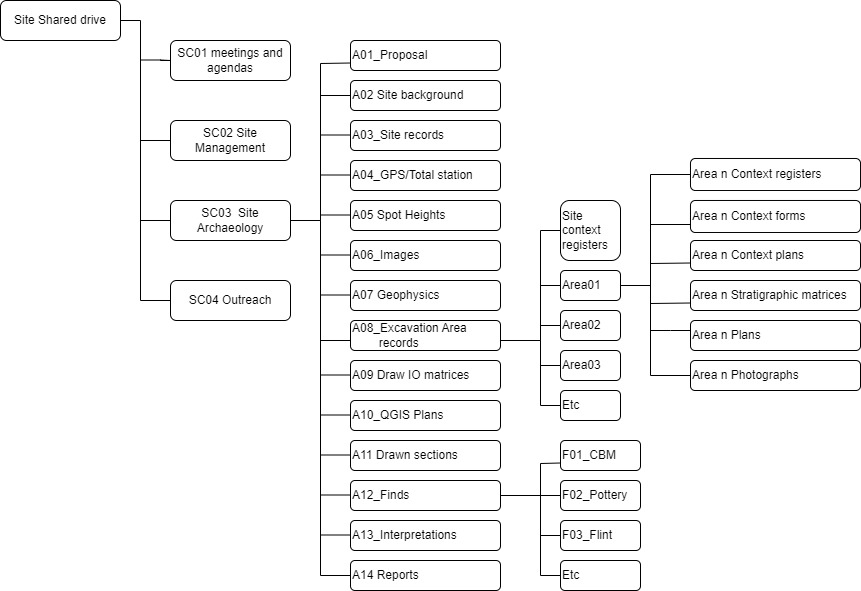
The overall filestore structure is shown in the figure above.
There are five layers of folders:
- The SC layer is used to record the Site Control information. This is usually the domain of the site management team
- SC03 Archaeology is significant because this is the folder where you give read access to everybody working on site. This enables them to read everything below this level
- The A level is used to record all the archaeology
- The area level is used to record excavation details. It is recognised that different organisations have generic terms for their excavated areas. These terms include area, trench, insertion etc. Change these folder names so they match what you are actually recording but maintain order by using a 2, 3 or longer alpha-numeric character code
- The finds level effectively creates filestore folders to record and interpret finds. Again, you will need to specialise these folders to match what you have found on your site and how you have assigned the work of identifying and working on finds to find specialists