
Table of Contents
Summary
This page of the user manual describes the tables used to record and interpret an archaeological excavation and explains how you can find details of the data held in the tables.
This is a relational database
The Anchurus II release 2 database is a relational database so data is held in tables. The tables hold their data in columns and rows. The tables are linked together with relationships. This structure of tables, table columns, table rows and inter-table relationships help to manage the integrity of the data from an excavation and during post excavation.
You access these tables using the Anchurus II web application.
Organisations, Anchurus II systems and databases
Each organisation using Anchurus II does so through an Anchurus II system; a self-contained entity which runs on a server and is completely independent of any other Anchurus system. This system is owned by the organisation and is operationally their responsibility.
Each system has its own database which is completely separate to the databases associated with other systems,
Within their system, an organisation can record the archaeological fieldwork on many different sites. The organisation can assign one or more sites to a project but within Anchurus II each site is treated as a separate entity with its own site manager and group of workers.
Overview of the database
The figure below shows the overall structure of an Anchurus II database. There are four main groups of tables.
- The Archaeological base tables: shown in blue, are the tables that are used to record the site, anomalies and contexts
- The Finds tables: shown in green, are the tables used to record finds and used by find specialists to develop find reports
- The Interpretation tables: shown in orange: are used to interpret the evidence from the site
- The Data access tables: shown in pink, are used to write SQL queries to give users access to the data in the other tables
The next sections in this manual page summarise the data held in these tables.
Table and column names
Anchurus II is supported by a MariaDB database, the naming conventions for table and column names are:
- Table names are in lower case alphabetic characters
- Column names in principle start with a capital alphabetic character followed by a sequence of alphanumeric capital and lower case characters – PascalCase or UpperCamelCase
- Columns which are part of the candidate key of a table have a leading capital letter followed by all lower case letters and end with “Id” a capital “I” and lower case “d”
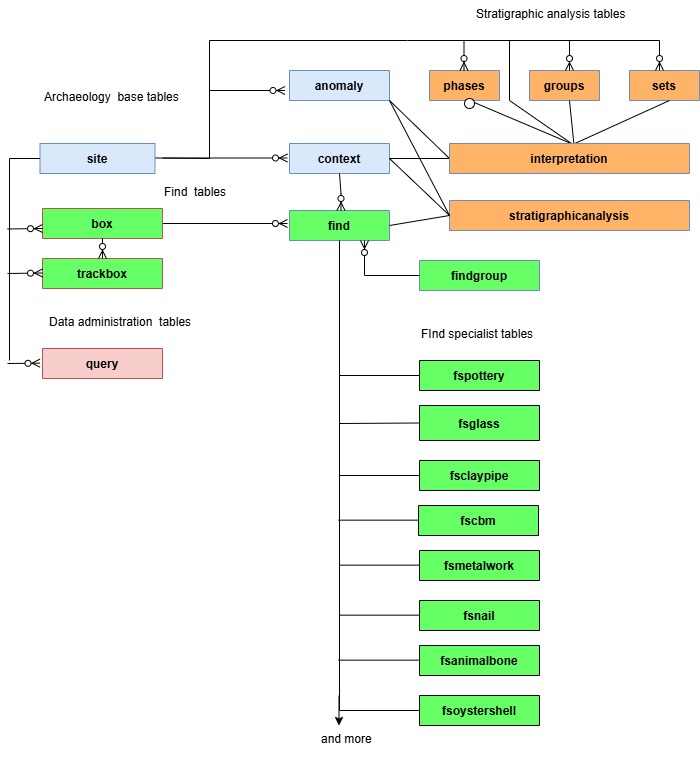
Figure 14.1. The Anchurus II database used to record and interpret an archaeological site
Archaeological base tables
These tables are:
site table
A site is located at a single modern address with single ownership and reflects the permissions required for archaeological intervention. As an archaeological site, it is a discrete geo-located area of ground that is undergoing archaeological investigation and excavation.
anomaly table
An anomaly is a two dimensional representation of human activity in a geophysics survey plot, a topological survey, a Lidar plot or a map of evidence. All the above can be geopositioned but in Anchurus II release 2, we record a textual record of the anomaly and its significance. so we can integrate this information in group with the other information to provide a fuller interpretation of the site.
context table
A context is the smallest unit into which the archaeological record may be divided (Clarke et al. 2019: 15).
A context is recorded in terms of:
- Type: what is represents, one of: deposit, cut, fill, structure
- Name1: the name given by the diggers
- Description1: in terms of the soil colour etc and its inclusions, written by the diggers
- Interpretation: written by the diggers
- Name2: given by the interpreters. This is the name used in reports
- Description2: given by interpreters. This is the interpreter’s description.
Note: when the content is first recorded. Name1 and Name2 are the same and Descritption1 and Description2 are the same. Thereafter Name1 and Description 1 are frozen so as to preserve the digger’s words, the interpreters can change Name2 and Description2
Finds tables
A find is a term applied to all artefacts, building materials, industrial residues, environmental material, biological remains (including human remains) and decay products (Introduction, Chartered Institute for Archaeologists).
The find tables enable you to record, catalogue, file away and store finds and to present them to Find Specialists to help identify their production, life histories and use of site and thereby write comprehensive finds report.
These tables are:
find table
All finds are recorded in the find table. This table represents the minimum details needed to link finds to contexts, and the other Stratigraphic Analysis tables together with the details necessary to maintain a catalogue, and a filing and storage system that embraces all your finds.
See the user manual page 18 Recording finds for the use of this table.
Find Specialist tables
Experience has shown that most find specialists have their own way of recording finds in their area of interest; typically this is recorded in a spreadsheet. Anchurus II supports this by providing a service whereby the Find Specialists spreadsheets can be converted into Find Specialist tables. This then allows us to combine the information their table with the Stratigraphic Analyse data and hence into matrices and plans.
Figure 14.1 shows some of the Finds Specialist tables that were used to record the finds found at our Blounts Court excavation.
findgroup table
For many years, pottery specialists have been identifying pottery groups, based on pottery fabrics and vessel forms etc. In parallel, in the IT industry, system architects have been using object oriented data analysis methods to analyse data. These two groups of people are doing the same task using different terminology.
In Anchurus II we recommend and teach users how to apply object oriented data analysis methods to most of the other find material types. The result of doing this is that for each material type we can identify findgroups.
A find group is a collection of finds that share characteristics which were established when the finds in that group were produced. For example a group of pottery finds made of the same fabric or a group of worked flints dating to the Bronze Age. Ideally, a find specialist will have identified the specific characteristics of finds in a find group. You identify find groups because they are going to be described in a finds report. For example if for a particular material type such as pottery or peg tile, you identify 20 find groups, you would expect to have a finds report with at least 20 find group paragraphs, describing what you found and its significance to the site you are excavating.
The findgroup table lists your find groups each with a name, description and, with luck, a production date range. Typically, each find in a find group will have a production date range inherited from that FindGroup but in some cases, a find has other features or marking which provide a spot date (a tighter date range). See user manual page 20 Finds analysis.
Stratigraphic analysis tables
Stratigraphic analysis concepts
Stratigraphic analysis involves identifying and consolidating definitions of:
- Phases: where a phase represents a period of use of a site embracing a succession of groups representing structures and/or areas of human activity on the site over time
- Groups: where a group represents a discrete area or period of human activity on the site as represented by a structure built on the site or a deposit or deposits which record the remains of human activity
- Sets: which are subgroups. A set is a number of contexts usually found in a single excavation area. It represents the evidence or remains of some human activity. A typical example of a set are a post hole recorded as a cut context and one or more fill contexts
- Anomalies: identified in surveys of the site
- Contexts: identified during the excavation of the site
- KeyFinds: which are key insofar as they provide key dating evidence or evidence of key human activity
- Dates periods: for the above together with your rationale for choosing them
- Brief descriptions: to remind you of all the above.
In the above, we have kept groups and sets separate from each other because it simplifies extracting data from the database to move it into the StratVis dating algorithm and Phase and group stratigraphy matrices.
Doing stratigraphic analysis
What is quite clear that doing stratigraphic analysis imposes as significant cognitive load on anybody who undertakes the task. One of the objectives of Anchurus II is to provide tools which reduces that load.
Anchurus II supports this objective by encouraging you to accumulate all this information in:
- Spreadsheets
- The database
- Phase and group matrices
- Site plans: typically one for each phase of use of the site. It should be presented in your archaeological report
- The Stratigraphic Analysis chapter of your archaeological report.
The Anchurus II database supports two approaches to supporting stratigraphic analysis. They are:
- The single table solution: where you use the stratigraphic analysis spreadsheet to develop your understanding of the site import the spread sheet into the stratigraphicanalysis table and then use queries to produce lists of phases and groups and to ensure that your stratigraphic analysis matches the excavated evidence
- The multi-table solution spread the evidence across the database solution: which uses separate phase, group, set and interpretation tables
Note: IADB 2017 spread these details more widely across phase, group, set, context and find tables ; we have yet to implement some of that solution in Anchurus II.
There is no doubt that different approaches will be implemented as users gain experience of undertaking stratigraphic analysis.
The single table solution
This approach records all the stratigraphic analysis information in one spreadsheet and a matching table
You start by creating the stratigraphic analysis spreadsheet. This records:
- The details of your stratigraphic analysis: the system allows you to hold several different versions so you can compare the differences you make as you learn more about your site
- The phases: with the names that you are going to present to your report readers rather than the names given by the excavators
- The groups: again with meaningful names that you are going to present in your report
- Anomalies: with a combination of the surveyors’ evidence and your stratigraphic analysis
- The sets
- The contexts: with descriptions with a combination of the excavators’ evidence and your stratigraphic analysis of the site. This approach ensures that the excavators’ evidence in the context table remains unchanged
- The keyfinds: these are finds that provide significant evidence that underpins your analysis
- Date periods: for the above
- Datesrationale: which explains why you have used these dates
From time to time you import the spreadsheet into the database stratigraphicanalysis table.
The benefits of using the stratigraphicanalysis spreadsheet is that you can keep it in chronological order and use colour to differentiate the details of different phases and groups and it is easy to move groups to keep them in chronological order.
The benefits of using the database is that you can use write queries to check the consistency between your analysis and the field work evidence as recorded in anomalies, sets, contexts and finds.
The multi-table solution
This uses several tables to record your stratigraphic analysis. They are:
Interpretation table
This is similar to the stratigraphicanalysis table insofar as you start by producing an interpretation spreadsheet and then load the details into the interpretation table.
This table records a series of interpretations that you make of a site which gives you a record of how your understanding of the site changed over time.
For each interpretation you record:
- Phases and within each phase the groups that existed during that phase
- Groups and within each group the sets, contexts and anomalies that contain the evidence confirming the existence and use of the group
- Sets and within each set the contexts that support it
- Date periods and dates rationale
This table is used to generate queries which link phases to contexts and it finds within that context or conversely to a find or collection of finds and shows the sets, groups and phases in which they were deposited.
Phases table
A report of a site usually identifies several phases starting the earliest dated phase and progressing through time. This approach is taken because human activities in the early phases influence the latest phases.
Each phase record has associated with it: a name. a description, a rationale as to why the archaeologist highlighted this as a phase and the time period when the phase was in use. Recording the rationale for choosing a phase is important because the choice can be influenced by a variety of factors including, in no particular order:
- The Ownership of the site and changes of ownership over time
- The structures found on the site
- The finds found on the site
- The use made of the site
The phases are recorded in the database as fully as possible and then exported to form the basis of an archaeological report.
Groups table
A Group record has a name, chosen to help anybody reading your archaeological report to understand what you found
Sets table
Note: in the Archaeologists Guide to Good Practice handbook (see user manual page 2) this concept is called a Subgroup, a name which detracts from its archaeological significance. If you would prefer the word “Subgroup” to “Sets“ then this is done in the Anchurus II database definition.
Data access tables
The Query table
One of the challenges of providing an IT system to support archaeologists is that many of them have little or no interest in technology. The way forward is to work towards the position where everybody working on the project has an understanding of Figure 14.1 above and the data sets it represents and hence can explain the information that want to access.
The workflow for creating a query involves the following steps:
- As an Anchurus II user, you write your requirement of the query in natural language and identify the tables you want to access
- The system administrator takes your request, translates it into a SQL statement (SQL is the language used to access the Anchurus II database) and runs it to retrieve data from the database and present it as a list
- You and the system administrator then review this together to confirm that it is producing the required results
- The system administrator completes the entry in the query table by adding guidelines to remind you how to use the query
The data held in tables and columns
Every table consists of a columns and rows. The easiest way for you to learn what data is held in a table is to:
- List the table. Figure 14.2 shows the contents of the Context table. The table header reminds you of “What is a context”
- You then select a row and view it. Figure 14.3 shows the columns in the table with, for each column a reminder of its contents and the value for the chosen context
See user manual Using the Anchurus II web application for how to list a table and view a table row.
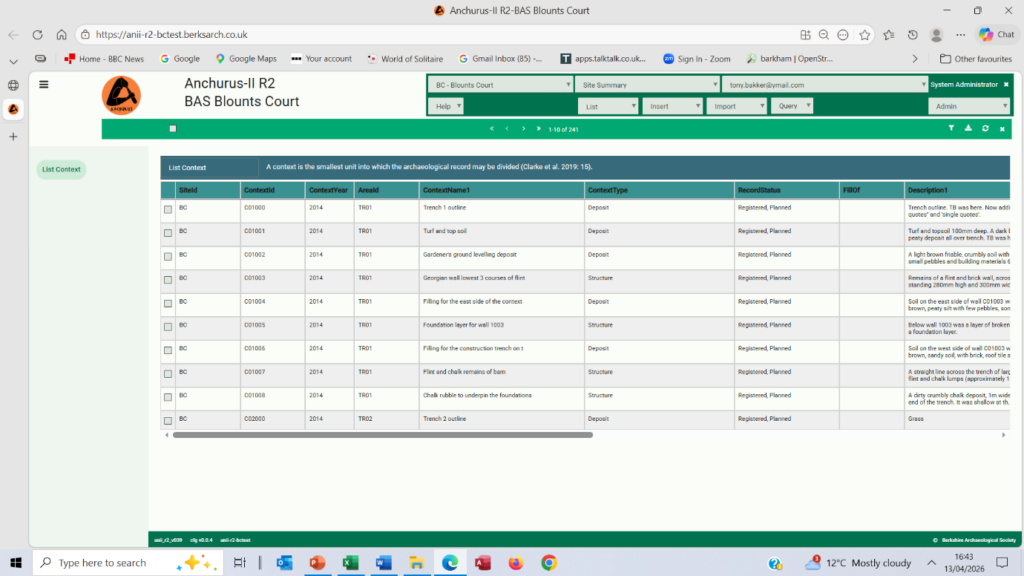
Figure 14.2 Screen shot of the Anchurus II web application showing the contents of the Context table
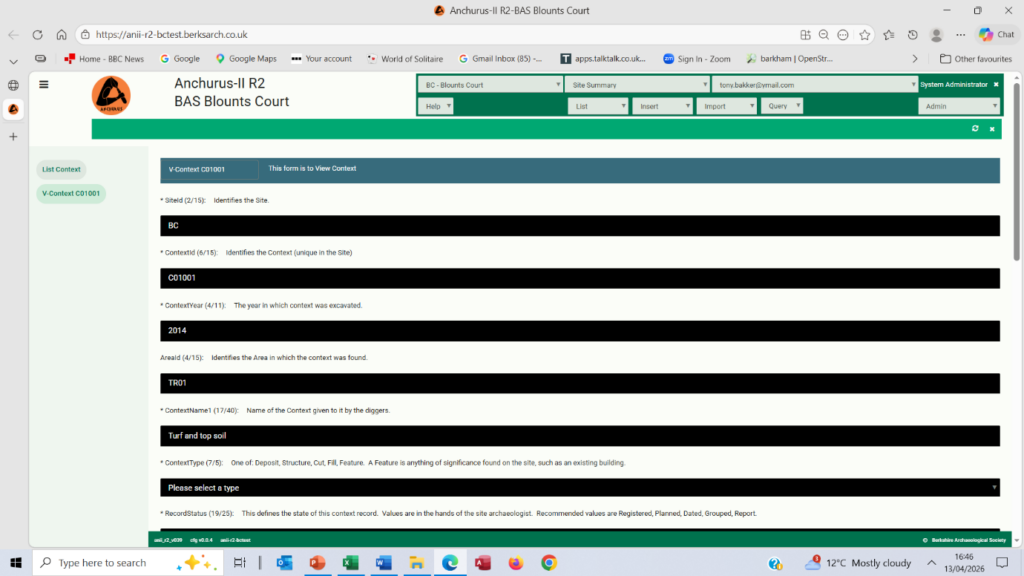
Figure 14.3. Screen shot of the Anchurus II web application showing the details of Context C01001
Table identifiers
Every row in a table is uniquely identified by the table’s candidate key. In the Anchurus II design, for most tables this consists of two columns:
- The SiteId: which identifies the site to which this column is related
- A table identifier: For the context table this is ContextId column, for the find table this is the FindId column
In Anchurus II all identifiers are 15 alpha-numeric characters with the strong recommendation that all identifiers start with an alphabetic character chosen so that all table identifier columns in a table start with the same character. This approach improves the accuracy of recording the archaeology and hence reduces errors and the costs of correcting them.
Figure 14.4 below shows the characters that has been used to start table identifiers following the SiteId column.
It should be stressed that the ideas presented in table 14.4 are examples of what you could do with this system. The system itself makes no checks to enforce these examples. This approach has been adopted so that organisations can easily migrate their existing approach to this system.
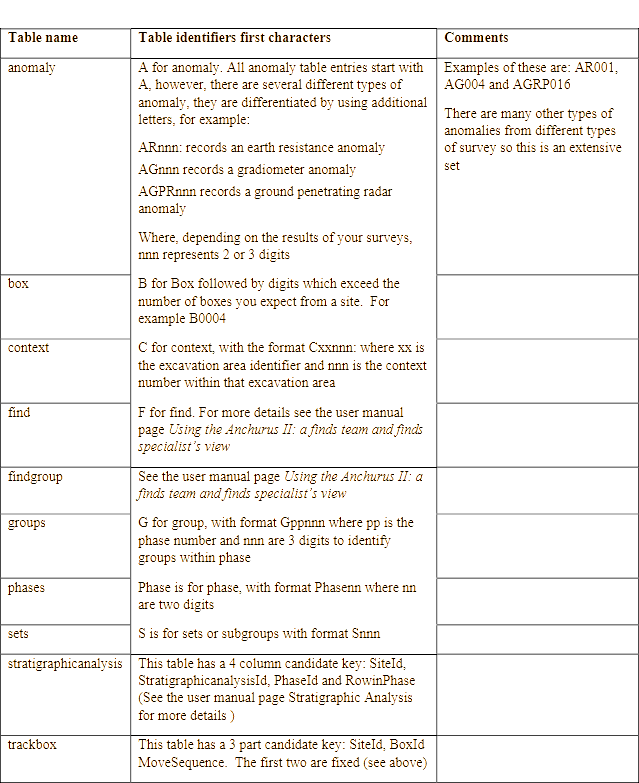
Figure 14.4. Table identifiers
Referential integrity
One of the features of using a relational database is that it manages the relationships between the tables (Figure 14.1). For example, when you register a find in the database, you include the context identifier of the context in which it was found. If there is no record of the context in the system, it will not allow you to register the find. Similarly, should a site leader decide to delete a context from the database, the system will check that there are no finds related to that context. If such finds exist, the site leader cannot delete the context until all the finds have been edited to delete their relationships with the context. These checks maintain the referential integrity of the database.
The table below lists the referential integrity checks carried out by the Anchurus II web application and its supporting database.
| The relationship between tables | Checks made by the system |
| site to all other tables | These checks are all automated once you have selected a site. You cannot delete a site record if there are any other tables with records points to it. This includes the site user records. |
| context to find | The context must be recorded before you register a find found in that context. You cannot delete a context record if there are find records linked to it. |
| find to box | You must record the box before you link find records to it. You cannot delete a box record if there are find records linked to it. |
| box to trackbox | You must record a box before you record its movement in the trackbox table. You cannot delete a box record if there are trackbox records linked to it. |
| find to all specialist find tables | You must record a find before you can create an associated find specialist table record. You cannot delete a find record if there is an associated find specialist table records linked to it. |
| find to findgroup | The findgroup record must be inserted before you link a find record to it. You cannot delete a findgroup record if there are find records linked to it. |
| interpretation to anomaly | An anomaly record must be created before you can link to it from the interpretation table You cannot delete an anomaly record if it is linked to an interpretation record. |
| interpretation to phase | A phase record must be created before you can link to it from the interpretation table. You cannot delete a phase record if it is linked to an interpretation record. |
| interpretation to groups | A group record must be created before you can link to it from the interpretation table. You cannot delete a group record if it is linked to an interpretation record. |
| interpretation to sets | A set record must be created before you can link to it from the interpretation table. You cannot delete a set record if it is linked to an interpretation record. |
| interpretation to context | A context record must be created before you can link to it from the interpretation table You cannot delete a context record if it is linked to an interpretation record. |
| stratigraphicanalysis to context | A context record must be created before you can link to it from the Stratigraphic analysis table. You cannot delete a context record if it is linked to a Stratigraphic analysis record. |
| stratigraphicanalysis to anomaly | An anomaly record must be created before you can link to it from the Stratigraphic analysis table. You cannot delete an anomaly record if it is linked to a stratigraphic analysis record. |
| stratigraphicanalysis to find via the KeyFind column | A find record must be created before you can link to it from the stratigraphic analysis table. You cannot delete a find record if it is linked to a stratigraphic analysis key find record. |
Figure 14.5. List of referential integrity constraints managed by Anchurus II web application
Andrew Hutt
Version v20e
21/08/2026